Introduction
Recently, I used AI to rewrite a personal project that I had maintained and run in production for six years. AI saved me a great deal of time and helped me build complex new features. At the same time, I also became more aware of its current limitations and gradually learned how to work with it more effectively. This article records the process and the lessons I drew from it.
A very important idea I took away from this rewrite is the feedback loop.
When AI works on a task, it goes through several stages: reasoning, calling tools, checking results, and iterating. A complete feedback loop means that AI can carry the task from start to finish without human intervention; the human only needs to provide the instruction. In practice, however, many programming tasks do not offer a complete feedback loop. Humans still need to step in to choose a design, connect missing tools, or verify results that AI cannot evaluate on its own.
Both the strengths and the limits of AI are shaped by how complete this loop is. As a result, the programmer’s role is gradually shifting from writing code by hand to building complete feedback loops for AI.
AI is already highly capable, but society is not yet fully prepared to integrate it. Many forms of work still lack the tools, interfaces, and verification mechanisms that AI needs. Building that surrounding software ecosystem may become an important direction in the years ahead.
I originally wrote this essey in Chinese,then used GPT-5.6 to assist with the English translation and reviewed and edited the final version myself.
Background
At the beginning of last year, I saw many people online saying that Cursor, Codex, and Claude Code had become genuinely useful. The software I worked on at the time, however, involved sensitive production data and was not suitable for unrestricted AI access. I therefore continued to use AI mainly for research while writing and debugging the code myself.
At the beginning of this year, a friend strongly recommended Codex to me. It was powered by GPT-5.4 at the time. I had just finished another project, reimplementing CPython's json library in Python, so I asked Codex to add support for comments to the syntax. Within a few minutes, it had written tests and completed the feature. I was amazed. I had still thought of AI mainly as a chatbot, and seeing it independently implement a programming feature felt almost magical.
When ChatGPT appeared in 2022, it attracted worldwide attention. Even then, I felt that the chatbot interface limited what an LLM could do. Real intelligence should be able to run experiments and learn from feedback from the world, because experimentation is one of the main ways we acquire knowledge. That would allow AI to go beyond the limits of pretraining and to reason, learn, and improve through interaction. At the time, I imagined systems controlling robotic arms or small vehicles. That seemed far away. Yet by 2026, AI had already gained the ability to act and experiment autonomously inside software environments.
I recently set aside a few months to study AI independently and needed a first project for exploring coding agents. I already had a personal tool called SmallTool, named in tribute to Smalltalk, so I decided to use AI to rewrite it from the ground up and add new features.
The project dates back to 2020. At the beginning of the pandemic, I used the Lunar New Year holiday to build a todo list for myself. The stack was simple: JavaScript, AJAX, and Flask, with deployment done manually from the command line. In early 2022, I rewrote it with Vue and Django. In 2023, I rewrote it again with TypeScript, React, and mypy, added a notebook, and automated deployment with Ansible. The application was still fairly small, with only about 3,000 lines of frontend and backend code, but it had been running reliably in production for six years.
When I revisited the project in 2026, I had several ideas for another rewrite:
- Simplify the stack: remove React, use Django templates, and switch to SQLite.
- Add a Markdown-based rich-text editor with real-time saving. The old notebook was only a basic HTML form.
- Build a Mac-like file system for the notebook, with nested folders and drag-and-drop movement.
- Build an Android client to track my phone usage. When I am under stress, I tend to overuse videos and long-form content. The first step toward reducing that habit is measuring how much time I spend on online media.
- Import data from my Garmin watch into the web application. Garmin collects a great deal of data, but its analysis tools are limited, so I wanted the freedom to analyze the data myself.
This was therefore more than a change of technology stack. It also added many new features and brought in data from two external devices: my Garmin watch and Android phone. It was not merely a refactor, but a substantial expansion.
In 2024, I wrote an article about my web technology stack. I now see that stack very differently. For a personal project, or the first version of a company product, I think it was too heavy. It introduced too much complexity and made development harder. This rewrite gave me a chance to see what would happen if I simplified it.
Results
By the time I wrote this article, the new SmallTool had been running for a month. Some of the first ideas for this article were even recorded in it.
The project has four main parts: a todo list, a notebook, Garmin data synchronization, and phone-usage tracking.
Here are the file system and notebook interfaces:
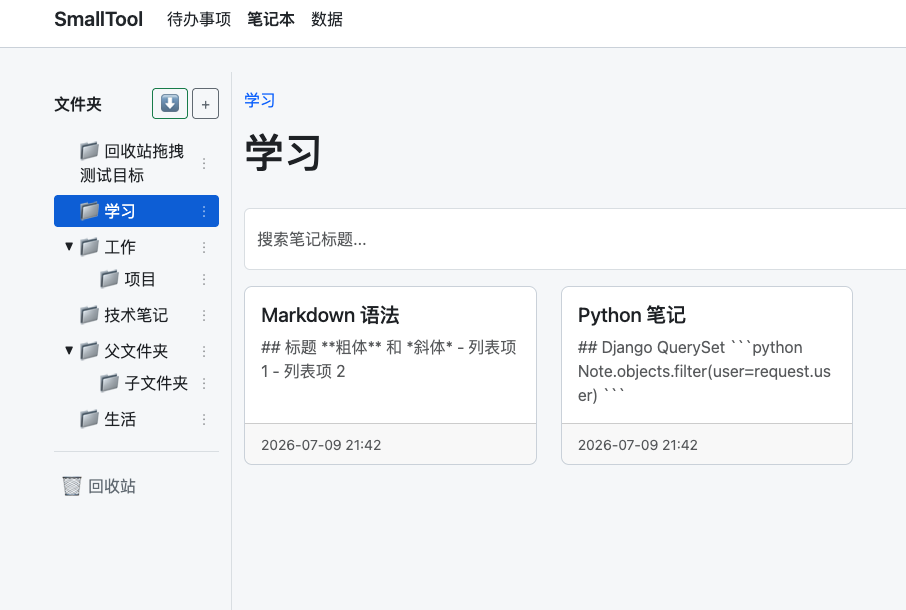
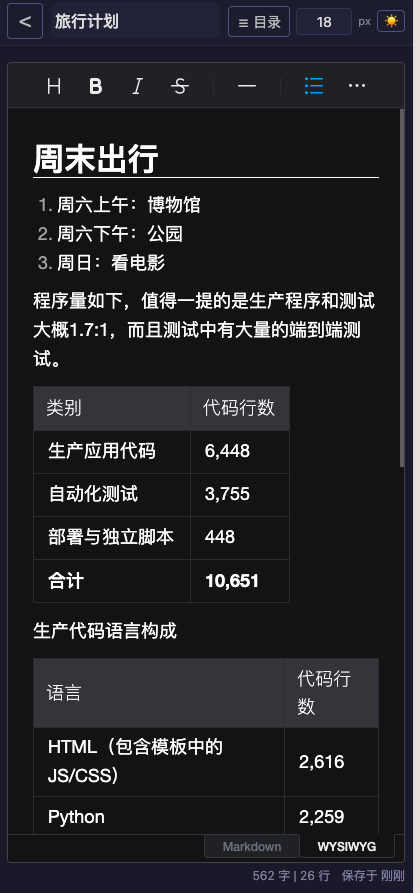
The core features are adapted for mobile use, and I refined many small UI details, including adjustable font sizes and a dark mode.
The Android interface is simple because most data presentation happens on the server. A persistent background notification collects usage data every two hours:

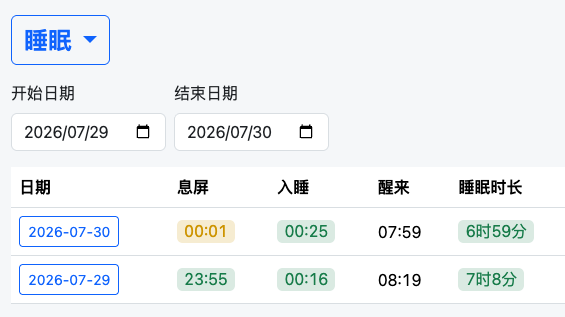
I also combine Garmin data with Android screen-off time for analysis. To understand my sleep at a glance, I label each day with a color:
The codebase is shown below. Production code and test code have a ratio of about 1.7:1, and the test suite includes many end-to-end tests.
| Category | Lines of Code |
|---|---|
| Production application code | 6,448 |
| Automated tests | 3,755 |
| Deployment and standalone scripts | 448 |
| Total | 10,651 |
Production code by language:
| Language | Lines of Code |
|---|---|
| HTML, including JS/CSS in templates | 2,616 |
| Python | 2,259 |
| Java | 1,469 |
| XML | 69 |
| Gradle | 34 |
| Total | 6,448 |
As mentioned earlier, I deliberately simplified the stack based on my experience with previous personal projects. I removed React, TypeScript, and mypy, and replaced PostgreSQL with SQLite. How did that work out?
Very well. I had worried that the simpler frontend stack might produce a worse UI or more repetitive code, but it did not. The code is concise, and SQLite made debugging much easier. For example, when I later parallelized the end-to-end tests, I could simply give each process its own SQLite database file without setting PostgreSQL server。
The AI Stack
During the first week, I used Kimi Code with K2.7 Code. During the second week, I used Codex with GPT-5.5. OpenAI upgraded the model to GPT-5.6 during the final days of the project. I did not notice a large difference between GPT-5.5 and GPT-5.6 on this project, although the difference might be clearer on a larger codebase.
I often exhausted my Codex quota. When that happened, I generated a handoff document for the current feature and asked Kimi Code to continue the work.
I read the code in VS Code and ran Kimi Code and Codex in its integrated terminal.
I subscribed to the $20 Codex plan and the 99-yuan Kimi Code plan. Alternating between them was enough for my current usage.
I initially had low expectations for a Chinese model, but K2.7 Code was surprisingly capable and worked very well throughout the project. Kimi Code’s interface, however, felt much less polished. Long commands were sometimes truncated, and the terminal occasionally displayed garbled text after extended use.
Codex felt more refined. Its interface used clearer highlighting, summarized its plans and actions in a readable way, and often continued until it finished the current task even when the usage quota was almost exhausted. That felt both generous and considerate.
Modern coding agents can also run for hours, or even tens of hours, from a detailed task document. I deliberately avoided that kind of “magic” because I first wanted to understand the details of working with AI. I also did not know all the product details in advance. I often needed to see a working version before I could decide what to change.
How AI Helped
AI gave me enormous leverage on this project. It saved time, reduced manual work, and allowed me to focus on the parts I found more interesting.
AI made the project possible.
The project took about 15 days and roughly 40 hours of work. Without AI, I estimate that it would have required at least 80 hours.
Those 40 hours were also relatively easy. I adjusted some UI details while talking with friends on the phone.
The difference between 40 and 80 hours was not merely a twofold change in speed. Without AI, I might have abandoned the project. Writing everything by hand would have required me to hold and reason about many details, and the work would have been exhausting. I would probably have removed features, skipped UI refinement, and reduced the project until it fit within 40 hours because I had other priorities competing for my time.
I also did not have the patience or energy to study CSS and Android development in depth. If I had written everything myself, the UI would probably have been rougher, and I might have dropped phone-usage collection entirely.
AI is already very good at writing and debugging software.
Throughout this project, AI replaced almost all of my manual coding and debugging. When it had access to a complete feedback loop, it needed very little human intervention.
A few examples surprised me. While developing the Android application, Codex could use Android debugging tools directly from my MacBook: it took screenshots, uploaded and downloaded files, inspected the application’s SQLite database, ran commands, compiled the APK, and installed it on my phone. It could complete the entire loop without me touching the device. During deployment, it used Ansible to run commands on the server, inspect SQLite, call production endpoints, and read Nginx logs. I did not need to perform any production operations myself.
My experience was that when I could give AI a clear goal and it could fully verify the result, the process could be highly automated.
In those situations, the human only needed to provide a precise instruction and wait to review the result.
AI also showed some higher-level engineering judgment. When Kimi built the file tree, for example, it suggested implementing a version without nested folders first, validating it, and only then adding nesting. This is a classic iterative approach: run a small experiment to test the idea before polishing every detail.
Current Limitations
AI still cannot complete the full development process on its own, and user feedback has become a bottleneck.
Several of its technical decisions were flawed.
When implementing autosave for the notebook, AI did not handle conflicts well. I later supplied the algorithm and UI design. For my use case, the client includes the note’s last-saved timestamp with each update. If the server sees that the submitted timestamp is stale, it asks the user to refresh. I can copy the text I just wrote, refresh the page, and continue editing without losing content.
When implementing the recycle bin, AI initially tried to mark deleted files with a status field. The change kept spreading through the codebase until the implementation lost direction. I replaced it with a simpler design that reused the existing folder system: one folder is reserved as the recycle bin. The new implementation was fast and required very few changes.
During a second round of Android development, the application could no longer call the web API. AI gradually moved toward increasingly low-level Android debugging tools. That did not feel right to me. I reminded it that the same setup had worked before and suggested that the cause might be a basic host configuration issue. It quickly found and fixed the problem.
Obtaining user feedback also blocked the development loop. Although AI wrote the code, it still depended on feedback from the user—in this case, me. I exported and analyzed the Codex session files. The average task ran for about three minutes, while the longest took one hour and twenty-two minutes because OpenAI had downgraded me to GPT-4o mini and I had not noticed. Many prompts, however, involved discussing technical designs, so the real time per task was often longer.
Most of the project’s 40 hours were spent with me acting as the user: trying an implementation, identifying problems, and giving AI the next round of feedback. User feedback therefore became the main bottleneck. For example, an early version placed the delete button next to the save button, which was unsafe. I first moved it elsewhere and eventually removed it entirely in favor of the recycle bin.
During the project, Codex also had a serious production bug that caused it to write very large volumes of logs. Running many agents for long periods could significantly reduce SSD lifespan, and some MacBook users reported being affected. This was a serious production issue with the potential to damage hardware. It also supports my broader point: some bugs fall outside the feedback loop available during development. AI cannot verify them inside its immediate environment and may only discover them through feedback from real users.
AI-Generated Technical Debt
After completing the project, I spent a day reviewing the code. I did not read every line. I focused on the architecture and API design, and I reviewed only the backend rather than the Django templates, JavaScript, and CSS. I paid particular attention to the tests because they strongly affect both correctness and the speed of AI debugging.
I was surprised to find several forms of technical debt.
First, AI seemed to treat tests as a debugger.
I expect tests to define and protect the core behavior of the program so that future changes do not break it.
AI, however, wrote tests around the history of individual feature changes and lacked tests for the main user workflows. For example, after I removed a button, it wrote an end-to-end test whose only purpose was to confirm that the button no longer existed.
End-to-end tests are slow, so I reviewed the suite and removed the redundant ones.
The tests were also poorly organized. AI created a new test file for almost every feature instead of grouping them by behavior or workflow.
This kind of test debt can gradually slow the suite, which in turn slows the feedback available to AI.
Some test files were also badly named. A test for inserting a date, for example, lived in a broadly named file called test_editor. I renamed these files because misleading names make the codebase harder for both AI and humans to understand.
In another case, one large test file covered two separate features without splitting them, making future changes more difficult.
AI tends to preserve obsolete code.
When I changed the implementation of the recycle bin, the code for the old design remained in the codebase even though nothing called it. If this kind of debt accumulates, it becomes increasingly difficult for both AI and humans to read and modify the system.
AI does not seem to have a strong instinct for cleanup and organization.
When I added account-security features, the related models and views ended up scattered across several places. I eventually consolidated them into a dedicated Django app. A human engineering team would already consider that a serious structural problem.
Overall, current AI coding systems still generate technical debt, and that debt can accumulate. I do not know whether AI will still be able to manage a project after the codebase grows to hundreds of thousands or millions of lines. The industry is rapidly adopting AI coding, and some programmers have stopped reading the generated code at all. I suspect that AI-generated technical debt will become a major issue within the next few years.
Many programmers currently focus on whether AI-generated code is correct. Correctness and maintainability, however, are different properties. If nobody reviews the design and structure, technical debt may eventually cross a threshold beyond which the software becomes extremely difficult to maintain.
For now, I believe that humans should still review the design and structure of important systems. We may be able to relax that requirement in the future.
The author of htmx has described a similar case in which an AI-generated fix introduced technical debt into an open-source project.
Why does AI still create technical debt? My explanation is that, from the perspective of software quality, it does not yet have a complete feedback loop. It can often verify whether software behaves correctly, but we still lack good automated tools for judging long-term software quality. Human intervention therefore remains necessary at this level.
Making software work and making software good are two different tasks.
How to Use AI Well
I believe the key to using AI well is to divide a larger task into smaller tasks with complete feedback loops. When necessary, we should build tools to complete those loops and then make the loops faster.
Task decomposition is straightforward. Some features, for example, require user feedback before the next iteration. In those cases, it is better to let AI complete a bounded first version and then get user feedback and try a new task.
I also had to complete the feedback loop myself while building both the web and Android applications.
AI does not always look for the best end-to-end loop on its own. It may simply generate code and ask me to test it manually. I had to tell it to build a better feedback loop.
At the beginning of the web work, AI wrote code and unit tests but expected me to perform the final validation. I asked it to install Chromium and Playwright so that it could run end-to-end tests automatically. During Android development, it initially asked me to copy and paste output or inspect the UI myself. I told it to use Android’s debugging tools, query the database, and take screenshots. After that, it used the Android debugging APIs to verify each new feature independently.
OpenAI published an article this year describing how its engineers use AI for production software development. Much of their work involves building an execution environment for the agent, such as connecting Codex to Chrome DevTools. This closely matches my experience. I spent a great deal of effort giving AI a fast and complete debugging loop.
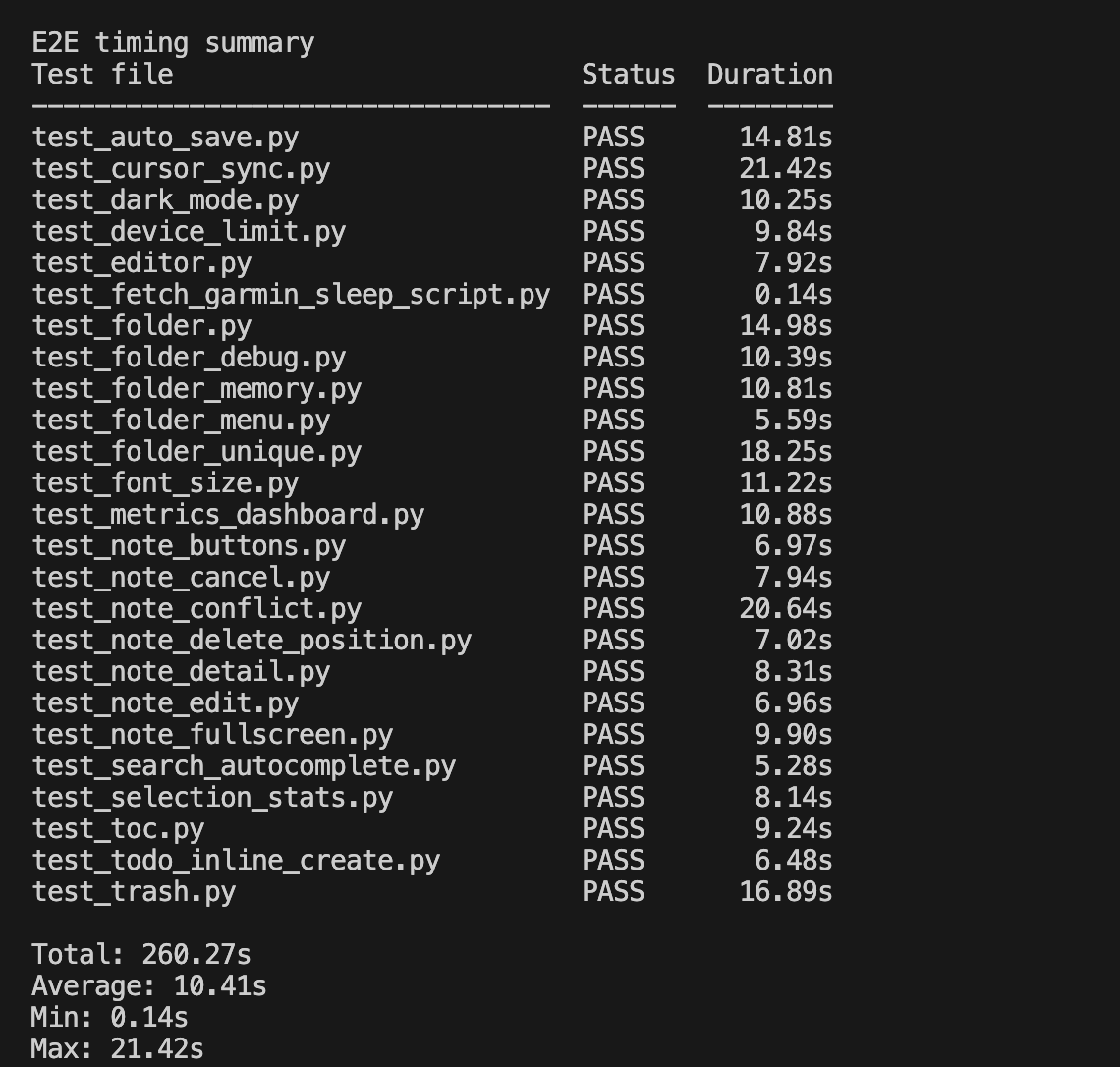
Another important factor is the speed of the feedback loop. During development, the end-to-end test suite grew to several thousand lines, and a full run took 260 seconds. Before every deployment, I had to wait nearly five minutes. If a change broke an existing feature, repeated full-suite runs could turn a small fix into half an hour of waiting and debugging. The development experience became very poor, so I made two changes:
- Parallel execution: I asked AI to build a test scheduler that recorded the runtime of each test and distributed the suite across multiple worker processes. This reduced the full test run from 260 seconds to 30 seconds.
- Optimization of individual tests: I removed a small number of redundant tests and split an oversized test file. This reduced the runtime further, from 30 seconds to nearly 13 seconds.
The result was an order-of-magnitude improvement in AI’s debugging loop and much faster automated feedback before deployment.
Before optimization:
After optimization:
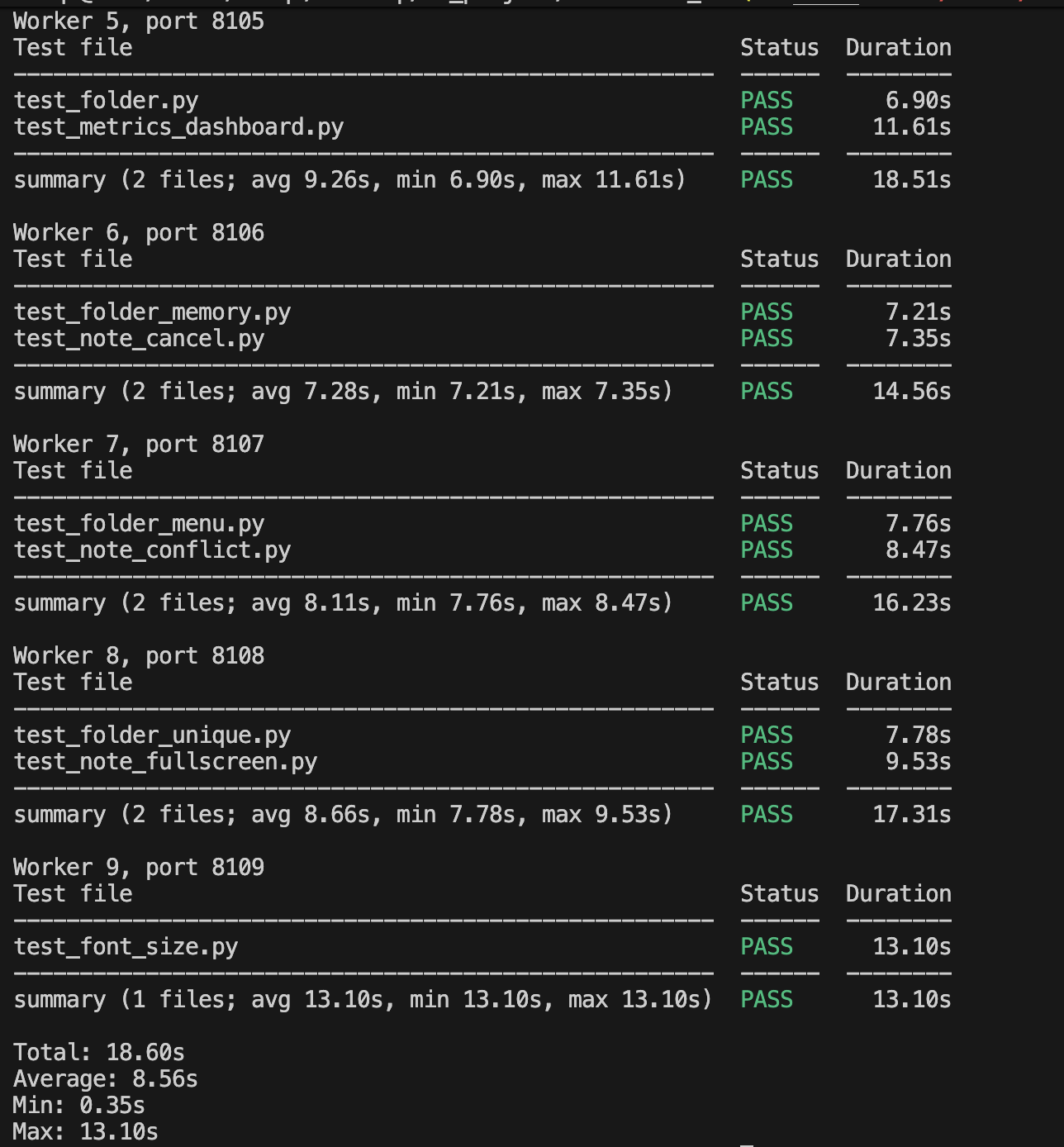
I think the industry will invest heavily in coding-agent environments. Fast debugging feedback has always mattered in software engineering, as shown by the development of IDEs, static analysis, and incremental compilation. An agent may run far more debugging iterations per day than a human, which makes feedback latency even more important. OpenAI’s acquisition of Astral and Anthropic’s acquisition of Bun both suggest that major AI companies are building out the surrounding software stack for agents.
It is also important to formalize engineering rules. I often carried rules in my head that AI did not consistently follow. For example, I divide feature work into two stages: development and deployment. During development, AI runs only the tests relevant to the feature and shows me the result without running the full suite. Once I approve it, the deployment stage runs the full test suite, pushes the code with Git, and deploys it to production. At first, I reminded AI of these rules manually. As the context grew, it started to forget them, so I wrote them into AGENTS.md. AI can now distinguish between development mode and deployment mode based on those instructions.
Reflections
Will programming disappear as a profession?
That depends on what we mean by programming. In my view, the purpose of work is to solve problems and create value. Programming is only one part of that work, and writing code by hand is only one part of programming.
I do think manual coding will become less important as more of it is delegated to AI. The remaining work—investigation, creative thinking, communication, reading, evaluation, planning, and decision-making—will become more important.
For example, at a medical research center where I once worked, the department handled large numbers of paper documents containing participant IDs and handwritten signatures. The files had to be renamed according to a standard that needs my colleagues to recognize the ID and participant name, then uploaded and matched in the hospital system.
During active studies, roughly one hundred documents arrived each day. They were carried from the study site to the office in a large box, and five colleagues spent an entire afternoon organizing and checking the filenames. I designed an automated workflow that completed each day’s renaming in about three minutes and also matched the scanned documents against the day’s participant list to detect errors.
Could I solve that problem simply by sitting at a computer and writing code? Of course not. First, I had to notice the problem by observing the entire research workflow and identifying which parts software could improve. Second, the handwritten signatures and IDs were difficult to recognize. I noticed that the study site had a label printer. If we could print each participant’s name and ID on a label and attach it to the document, OCR would become much more reliable.
I first learned how to use the department’s label printer. Then I experimented with different layouts and found one that the OCR system could read accurately. I also had to speak with many colleagues to understand who was responsible for printing labels, attaching them, scanning documents, and handling the other steps. Different people gave different answers, so I had to make judgments and eventually persuade everyone involved to change their workflow. Writing the OCR code was the easiest part.
Much of this work had nothing to do with writing code. It involved asking questions, understanding a process, and persuading people. My job was to solve the problem; building software was only one step.
A large part of my past programming work also involved reading documentation and getting APIs to work, which I often found unpleasant. When I previously built the notebook with React, for example, the project used MUI and esbuild. A compatibility problem between them produced a low-level build error. I spent two full days searching before finding the solution in an official chat group. I do not want to repeat that experience. AI is valuable partly because it frees me from this kind of tedious work.
A deeper question is whether AI may one day create value and solve problems entirely on its own. That is closer to science fiction and lies outside the scope of this article. My focus here is practical: how to plan and explore the next few years.
Is everyone now a programmer?
Some people argue that because AI allows everyone to write software, nobody should become a programmer and existing programmers should change careers.
We can restate the argument this way: online forums allow everyone to write, so all professional writers should quit their careers.
The problem is obvious. Designing useful systems and products still requires knowledge, judgment, and execution. AI may have lowered the barrier to programming toward the barrier to writing, but that barrier is still high.
I have seen inspiring examples. A film director on Weibo used AI to write software that organized decades of material stored on his computer and also built a voice-input tool. Yet just as valuable writing remains rare, valuable software will remain rare.
The difficulty rises sharply at every stage: from writing a demo, to building a complete personal application such as an iOS expense tracker, to operating a production system for many users.
One user on X described a similar experience. Someone on a relative’s team built an internal JIRA replacement and was initially very excited. After some time, however, the team returned to the commercial product because maintaining even a JIRA replacement with AI still required too much effort alongside their main jobs.
I built only a personal product, yet refining the UI still took a great deal of effort. I was willing to do that because I care about personal tools and understand software. For a tool I did not care about, I would still prefer to buy an existing product.
What comes next?
Even if AI stopped improving today, programming has already changed permanently. AI coding tools are still poorly understood and only partially developed, leaving many opportunities unexplored. Software is becoming part of society’s core infrastructure, and changes in software development will reshape many other areas from the top down. We are still at the beginning of this transition.
Nobody knows exactly how we should plan our work and learning. At the beginning of a major technological shift, nobody fully understands how the technology will be used, and everyone is still exploring. My approach is to follow AI closely and actively integrate it into my work and life. We should not only keep moving; we should also look up and make sure we are moving in the right direction.
I believe future decisions should be made with feedback loops in mind. Whenever AI can easily obtain a complete feedback loop for a task, we should ask: do I still need to do this by hand? Spending large amounts of time coding manually is becoming less valuable. The programmer’s role will increasingly be to build complete, fast feedback loops around software work, while humans focus on the parts that matter more. Many existing software systems will evolve into new forms as a result.